
Boost local visibility with business schema: A practical guide
Nearly half of all local business websites are leaving serious search traffic on the table right now. 45% of local sites lack schema markup entirely, which means they’re missing out on up to 58% higher click-through rates from rich results. For Canadian electricians, HVAC companies, dentists, and other service providers competing for the same local customers, that gap is the difference between the phone ringing and sitting silent. This guide explains exactly what business schema is, how to pick the right type, what the measurable impact looks like, and how to avoid the most common mistakes that quietly undermine your local rankings.
Table of Contents
- Understanding business schema: The foundation for local search
- Choosing the right schema type: LocalBusiness vs Organization
- The measurable impact: Why business schema moves the needle
- Implementation essentials and pitfalls: How to get schema right
- Why most business schema advice misses the mark for Canadians
- Take the next step: Unlock your business’s full local search potential
- Frequently asked questions
Key Takeaways
| Point | Details |
|---|---|
| Schema unlocks rich results | Adding business schema can significantly boost your visibility with enhanced Google search features. |
| Choose schema type wisely | Selecting the correct schema ensures your signals are clear and maximises your local search benefit. |
| Details must match everywhere | Keep your NAP and service info consistent across your website, Google profile, and schema for maximum trust. |
| The payoff is measurable | Proper schema can deliver up to 30% more clicks and calls from search—gains that most competitors skip. |
| Regular updates win | Quarterly validation of your schema keeps your business at peak local search performance. |
Understanding business schema: The foundation for local search
With the stakes clear, let’s break down what business schema really means for your visibility.
Structured data is code you add to your website that helps search engines understand your content in a precise, machine-readable way. Think of it as a nametag for your business written in a language Google, Bing, and AI tools like ChatGPT can read instantly. Schema markup is the vocabulary that makes this possible, and Schema.org is the shared library of terms that all major search engines agreed to use.

Business schema uses Schema.org types like LocalBusiness or Organization to describe your service business’s name, address, phone number (NAP), hours, geo-coordinates, and services, enabling rich search results and improved local visibility. That means your business information can appear directly in search results as enhanced listings, complete with hours, star ratings, click-to-call buttons, and a map pin.
What gets triggered by adding business schema
When your schema is correctly set up, Google can surface these features for your listing:
- Google Maps integration: your exact location with accurate hours
- Click-to-call buttons: mobile users can call you from the results page without visiting your website
- Business hours panels: including holiday hours and special schedules
- Star ratings and review counts: pulled through when Review schema is paired with LocalBusiness
- Service area details: particularly useful for trades businesses like plumbers and electricians
The essential business details your schema must capture include your official business name, full Canadian address (with province and postal code), primary phone number, service categories, operating hours, and the geographic area you serve. For a Toronto HVAC company or a Vancouver dental clinic, this level of detail tells Google exactly what you do, where you do it, and when customers can reach you.
It’s also worth noting that mobile search and schema work together tightly. The majority of local service searches happen on mobile, and schema is what triggers the tap-to-call and map features that make conversion so much faster.
| Business type | Recommended schema type | Key fields |
|---|---|---|
| Single-location HVAC | LocalBusiness | NAP, hours, serviceArea |
| Multi-location dental clinic | Organization + LocalBusiness | HQ entity + per-location NAP |
| Mobile electrician (no storefront) | LocalBusiness (ServiceArea) | serviceArea, areaServed |
| National franchise location | Both | Parent Organization + local node |
Choosing the right schema type: LocalBusiness vs Organization
Now that you know what schema is, the next step is choosing the correct type for your situation.
This is where many Canadian service businesses make their first critical error. They either apply a generic Organization schema to every page, or they use LocalBusiness inconsistently across their site, creating conflicting signals that search engines can’t reconcile.
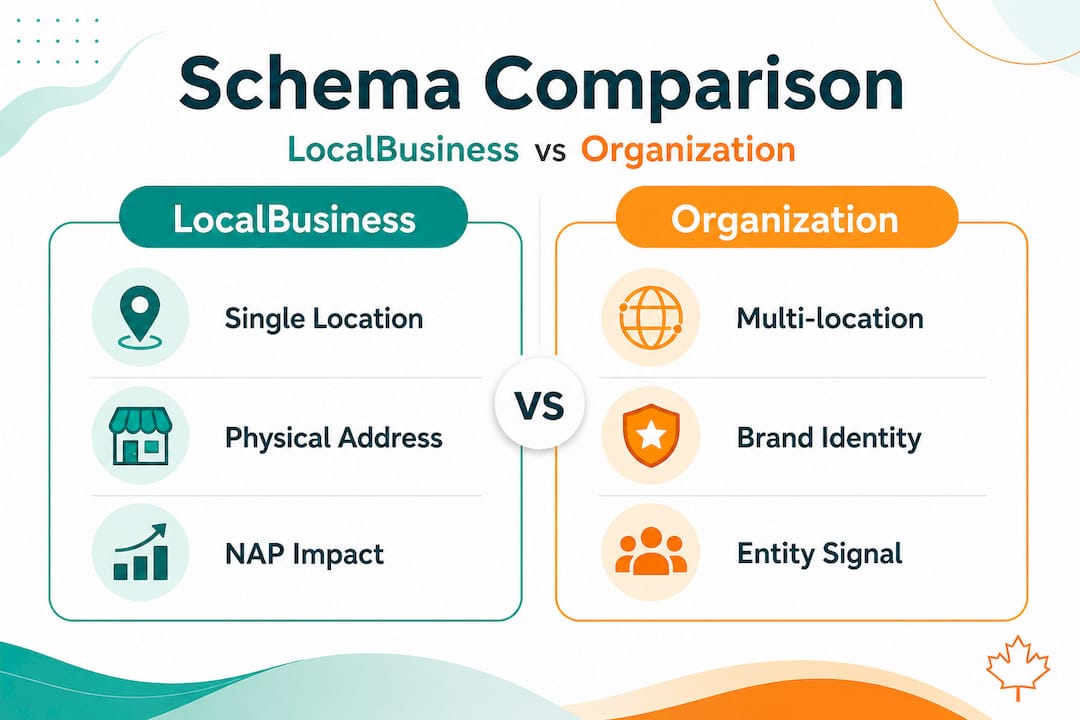
Here’s how Google distinguishes between these types. LocalBusiness schema serves customer-facing locations and is what boosts your map visibility and local pack placement. Organization schema is best for your overall brand entity or head office. Multi-location businesses should use both: Organization on your homepage to represent the brand, and a separate LocalBusiness entry for each physical location.
Choosing the wrong type doesn’t just give you no benefit. It actively dilutes your local signals. If a plumbing company in Calgary applies only Organization schema to all five of their location pages, Google treats the website as a brand entity rather than five distinct, rankable service locations. Each location loses its ability to compete in the local pack.
How to map your business and choose the right schema
- List every customer-facing location you operate, including service-area-only locations where you don’t have a storefront but serve a defined geography.
- Identify your brand entity. If you have a company headquarters or a parent company, that becomes your Organization node.
- Assign LocalBusiness to each location page. Each page should describe exactly one location with its own unique NAP details.
- Use the most specific subtype available. Schema.org includes subtypes like "Electrician
,Dentist,HVACBusiness, andPlumber`. The more specific your type, the more precise Google’s understanding of your service. - Cross-link entities using
@idandsameAs. This tells search engines that your LocalBusiness entries belong to the same parent Organization.
Pro Tip: If your business operates across multiple Canadian provinces, use the areaServed property to list each province or city explicitly. This helps AI-powered search tools understand your true service geography, not just your registered address.
| Schema type | Best for | Local pack impact | Brand entity signal |
|---|---|---|---|
| LocalBusiness | Physical or service-area businesses | High | Low |
| Organization | HQ, franchise brand, online-only | Low | High |
| Both (combined) | Multi-location service companies | High | High |
Also consider the broader context of business signals for local SEO. Schema is one signal among many, but it’s the one that ties all your other signals together into a coherent, machine-readable identity.
The measurable impact: Why business schema moves the needle
Picking the right schema is only half the battle. The payoff in local search can be dramatic.
The performance data on schema for local service businesses is compelling. LocalBusiness rich results deliver roughly 20 to 30% CTR lift for local service queries. Businesses that implement schema correctly report around 22% more clicks and 18% more calls from local search results. Sites with schema average a ranking position of 5.1 compared to 5.4 for those without. That fraction-of-a-point difference may sound small, but at the local pack level it routinely represents dozens of additional visibility impressions per day.
Statistic to keep on hand: 45% of local websites still lack schema. Among those that do have it, rich result pages earn 58% more clicks than plain listings. If your competitors haven’t implemented schema, this is your window to leapfrog them.
The AI search angle is increasingly important as well. The impact on AI-powered search is becoming a major factor, with AI citation rates rising 41% for businesses that use LocalBusiness schema. Tools like ChatGPT and Google’s AI Overviews pull structured data to answer local service queries. If your schema is missing or malformed, your business simply doesn’t exist in those answers.
What you’re missing without schema
- Rich result features like star ratings, hours, and call buttons
- Higher placement in Google’s local 3-pack results
- Citation eligibility in AI-generated answers
- Faster mobile conversions from tap-to-call
The SEO impact for service businesses goes beyond rankings alone. Schema creates a faster path from search query to customer contact, and that compresses your sales cycle. A roofing company in Edmonton that shows hours, reviews, and a call button directly in search results removes three steps from the customer journey before they’ve even seen your website.
| Metric | With LocalBusiness schema | Without schema |
|---|---|---|
| Average CTR (local queries) | ~30% higher | Baseline |
| Phone call conversions | +18% | Baseline |
| Average ranking position | 5.1 | 5.4 |
| AI citation inclusion | +41% | Baseline |
Implementation essentials and pitfalls: How to get schema right
Seeing the data is compelling, but success lies in practical setup and avoiding damaging mistakes.
The recommended format for implementing business schema is JSON-LD (JavaScript Object Notation for Linked Data). Google officially recommends it, and it sits cleanly in your page’s <head> tag without interfering with your visible content. You don’t need to rewrite your entire site to add it.
Step-by-step: Adding LocalBusiness schema to your site
- Start with your most important location page, usually your homepage or your primary city page.
- Choose your specific Schema.org subtype, such as
ElectricianorDentalClinic, rather than the genericLocalBusiness. - Build your JSON-LD block with these required fields:
@context,@type,name,address(withstreetAddress,addressLocality,addressRegion,postalCode,addressCountry),telephone,openingHours, andurl. - Add your geo-coordinates using the
geoproperty withlatitudeandlongitude. This is particularly important for service-area businesses without a storefront. - Include
@idandsameAsreferences to connect your schema to your Google Business Profile URL and other authoritative directory listings. - Paste the JSON-LD into the
<head>tag of your page or use your CMS’s schema plugin to inject it. - Validate using Google’s Rich Results Test before publishing. Fix any errors before the page goes live.
A critical rule that catches many businesses off guard: schema must match visible page content. If your schema says you’re open until 6pm but your website says 5pm, Google flags this as a trust issue. The same applies to your address and phone number. Every field in your schema must match exactly what appears on the page and what’s listed in your Google Business Profile.
The NAP consistency rule: “St.” and “Street” are different strings to a search engine. Pick one format and use it identically across your website, schema, Google Business Profile, and every directory listing. Inconsistencies erode the trust signals that drive local rankings.
Schema amplifies your Google Business Profile but it does not replace it. Your GBP remains the primary local signal. Schema acts as a secondary layer of confirmation that reinforces what Google already knows about you. Together, they create a much stronger local signal than either one alone.
Operationally, automation tools help maintain NAP consistency across your website, directories, and schema simultaneously. Businesses that automate this process have far fewer trust signal inconsistencies over time.
For practical templates and validation workflows, the resources at schema markup templates and validation walk through real examples built for Canadian service business formats.
Pro Tip: Set a quarterly calendar reminder to validate your schema using Google’s Rich Results Test. Business hours, phone numbers, and service areas change more often than most owners realise, and stale schema is nearly as harmful as no schema at all.
Why most business schema advice misses the mark for Canadians
Practical advice is only as good as its real-world fit. Here’s what most local businesses are never told.
Most schema guides and templates circulating online were built for US-based businesses. They use American address formats, US-centric examples, and optimisation logic that doesn’t map cleanly onto the Canadian local search landscape. That matters more than it sounds.
Canadian postal codes follow a letter-number-letter format that differs entirely from US ZIP codes. Province abbreviations like ON, BC, and AB aren’t the same as US state codes, and Google’s local algorithms account for these distinctions. A templated schema block that uses “State” instead of “Province” or formats the postal code incorrectly sends subtle wrong signals about your business’s location accuracy.
The mobile user patterns in Canadian cities also differ from the US. Cities like Calgary, Ottawa, and Halifax have geographic and demographic patterns that affect how search intent clusters around service area terms. Schema that doesn’t account for service-area specificity, using properties like areaServed with actual Canadian city and province names, misses how local AI tools resolve service queries.
Here’s the uncomfortable truth: most service businesses set their schema once when they launch their website and never touch it again. They use a generic plugin, accept the default settings, and assume they’re covered. In practice, that schema often contains outdated hours, missing geo-coordinates, or a phone number that changed two years ago. It creates the appearance of compliance while delivering none of the benefit.
The businesses that actually win the local search game treat schema as a living asset, not a one-time task. They tune it when they open new service areas. They update it when they add services. They validate it when rankings shift. Understanding how AI ranks businesses today reveals that the businesses earning AI citations are the ones with the most consistently accurate and specific structured data, not just the ones who checked a box.
The real opportunity for Canadian service businesses right now is that the majority of your local competitors are either missing schema entirely or running stale, generic versions. A modest investment in accurate, specific, and regularly maintained schema puts you in the top tier of local search readiness without requiring a full site rebuild.
Take the next step: Unlock your business’s full local search potential
Implementing business schema correctly takes precision, and for multi-location service companies or specialised trades businesses, the details get complex fast. That’s where expert support makes the difference.
At Locally Visible, we handle AI SEO for your industry as a done-for-you service built specifically for Canadian local service businesses. We build and maintain schema that matches your Google Business Profile, keeps your NAP consistent across directories, and positions your business to be cited by AI search tools like ChatGPT within 90 days or we work free until you are. If you’re ready to stop guessing and start showing up, explore our local SEO solutions and see what’s possible for your business.
Frequently asked questions
Is business schema mandatory for showing up on Google Maps?
Business schema is not mandatory but strongly recommended, as it boosts the chances of earning rich results and increases visibility on Google Maps when combined with an optimised Google Business Profile. As Google notes, schema amplifies your GBP rather than replacing it, making both work harder together.
How often should my business schema markup be updated?
It’s best to validate and update your business schema at least once every quarter or whenever your contact details, hours, or service areas change to prevent trust signal erosion.
What happens if my address and phone number are inconsistent in my schema markup?
NAP inconsistencies such as abbreviating “Street” as “St.” in one place and spelling it out in another erode search engine trust and can directly reduce your local ranking potential over time.
Can I use both LocalBusiness and Organization schema?
Yes. Use Organization for your overall brand on the homepage and a separate LocalBusiness entry for each physical or service-area location to maximise both your brand authority and local pack visibility simultaneously.
Recommended
- Boost your local search visibility with business signals — Locally Visible
- Business visibility strategies for Canadian local services — Locally Visible
- Business visibility strategies for Canadian local services — Locally Visible
- JSON-LD Schema for Local AI Citations | Copy-Paste Templates
- Effective ways to promote your business locally in the UK